主题
Prompts
简介
Laravel Prompts 是一个 PHP 包,用于在命令行应用中添加美观且用户友好的表单,具有类似浏览器的功能,包括占位符文本和验证。
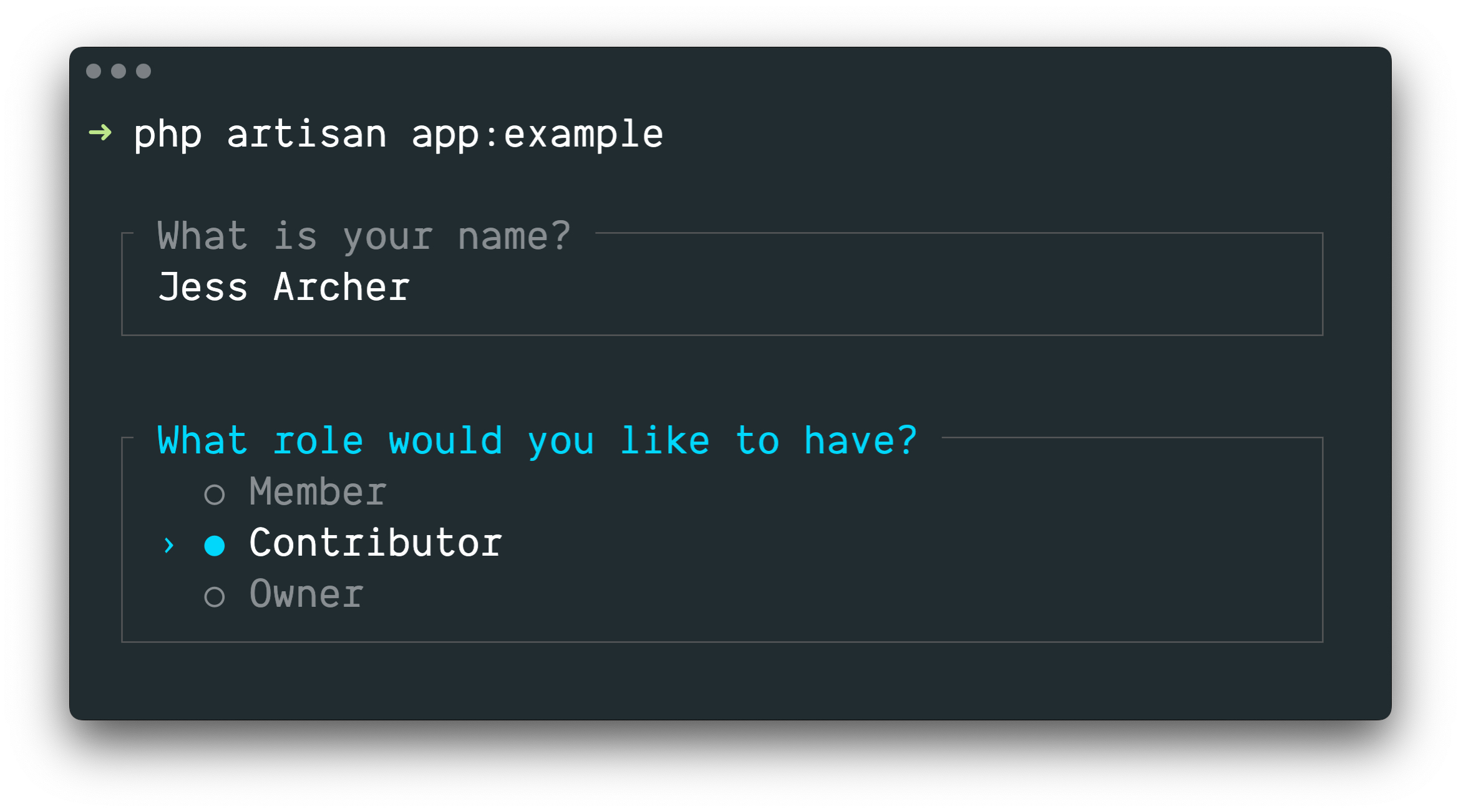
Laravel Prompts 非常适合在 Artisan 控制台命令中接受用户输入,但它也可以在任何命令行 PHP 项目中使用。
NOTE
Laravel Prompts 支持 macOS、Linux 和 Windows with WSL。更多信息请参阅我们关于不支持的环境和回退方案的文档。
安装
Laravel Prompts 已包含在最新版本的 Laravel 中。
Laravel Prompts 也可以通过 Composer 包管理器安装到其他 PHP 项目中:
shell
composer require laravel/prompts可用的 Prompts
Text
text 函数将使用给定的问题提示用户,接受其输入,然后返回它:
php
use function Laravel\Prompts\text;

$name = text('What is your name?');
你还可以包含占位符文本、默认值和信息提示:
php
$name = text(
    label: 'What is your name?',
    placeholder: 'E.g. Taylor Otwell',
    default: $user?->name,
    hint: 'This will be displayed on your profile.'
);
必填值
如果你需要输入一个值,可以传递 required 参数:
php
$name = text(
    label: 'What is your name?',
    required: true
);
如果你想自定义验证消息,也可以传递一个字符串:
php
$name = text(
    label: 'What is your name?',
    required: 'Your name is required.'
);
额外验证
最后,如果你想执行额外的验证逻辑,可以将闭包传递给 validate 参数:
php
$name = text(
    label: 'What is your name?',
    validate: fn (string $value) => match (true) {
        strlen($value) < 3 => 'The name must be at least 3 characters.',
        strlen($value) > 255 => 'The name must not exceed 255 characters.',
        default => null
    }
);
闭包将接收已输入的值,并可以返回错误消息,如果验证通过则返回 null。
或者,你可以利用 Laravel 验证器的强大功能。为此,请向 validate 参数提供一个包含属性名称和所需验证规则的数组:
php
$name = text(
    label: 'What is your name?',
    validate: ['name' => 'required|max:255|unique:users']
);
Textarea
textarea 函数将使用给定的问题提示用户,通过多行文本区域接受其输入,然后返回它:
php
use function Laravel\Prompts\textarea;

$story = textarea('Tell me a story.');
你还可以包含占位符文本、默认值和信息提示:
php
$story = textarea(
    label: 'Tell me a story.',
    placeholder: 'This is a story about...',
    hint: 'This will be displayed on your profile.'
);
必填值
如果你需要输入一个值,可以传递 required 参数:
php
$story = textarea(
    label: 'Tell me a story.',
    required: true
);
如果你想自定义验证消息,也可以传递一个字符串:
php
$story = textarea(
    label: 'Tell me a story.',
    required: 'A story is required.'
);
额外验证
最后,如果你想执行额外的验证逻辑,可以将闭包传递给 validate 参数:
php
$story = textarea(
    label: 'Tell me a story.',
    validate: fn (string $value) => match (true) {
        strlen($value) < 250 => 'The story must be at least 250 characters.',
        strlen($value) > 10000 => 'The story must not exceed 10,000 characters.',
        default => null
    }
);
闭包将接收已输入的值,并可以返回错误消息,如果验证通过则返回 null。
或者,你可以利用 Laravel 验证器的强大功能。为此,请向 validate 参数提供一个包含属性名称和所需验证规则的数组:
php
$story = textarea(
    label: 'Tell me a story.',
    validate: ['story' => 'required|max:10000']
);
Number
number 函数将使用给定的问题提示用户,接受其数字输入,然后返回它。number 函数允许用户使用上下箭头键来调整数字:
php
use function Laravel\Prompts\number;

$number = number('How many copies would you like?');
你还可以包含占位符文本、默认值和信息提示:
php
$name = number(
    label: 'How many copies would you like?',
    placeholder: '5',
    default: 1,
    hint: 'This will be determine how many copies to create.'
);
必填值
如果你需要输入一个值,可以传递 required 参数:
php
$copies = number(
    label: 'How many copies would you like?',
    required: true
);
如果你想自定义验证消息,也可以传递一个字符串:
php
$copies = number(
    label: 'How many copies would you like?',
    required: 'A number of copies is required.'
);
额外验证
最后,如果你想执行额外的验证逻辑,可以将闭包传递给 validate 参数:
php
$copies = number(
    label: 'How many copies would you like?',
    validate: fn (?int $value) => match (true) {
        $value < 1 => 'At least one copy is required.',
        $value > 100 => 'You may not create more than 100 copies.',
        default => null
    }
);
闭包将接收已输入的值,并可以返回错误消息,如果验证通过则返回 null。
或者,你可以利用 Laravel 验证器的强大功能。为此,请向 validate 参数提供一个包含属性名称和所需验证规则的数组:
php
$copies = number(
    label: 'How many copies would you like?',
    validate: ['copies' => 'required|integer|min:1|max:100']
);
Password
password 函数类似于 text 函数,但用户的输入在控制台中输入时会被遮蔽。这在询问密码等敏感信息时非常有用:
php
use function Laravel\Prompts\password;

$password = password('What is your password?');
你还可以包含占位符文本和信息提示:
php
$password = password(
    label: 'What is your password?',
    placeholder: 'password',
    hint: 'Minimum 8 characters.'
);
必填值
如果你需要输入一个值,可以传递 required 参数:
php
$password = password(
    label: 'What is your password?',
    required: true
);
如果你想自定义验证消息,也可以传递一个字符串:
php
$password = password(
    label: 'What is your password?',
    required: 'The password is required.'
);
额外验证
最后,如果你想执行额外的验证逻辑,可以将闭包传递给 validate 参数:
php
$password = password(
    label: 'What is your password?',
    validate: fn (string $value) => match (true) {
        strlen($value) < 8 => 'The password must be at least 8 characters.',
        default => null
    }
);
闭包将接收已输入的值,并可以返回错误消息,如果验证通过则返回 null。
或者,你可以利用 Laravel 验证器的强大功能。为此,请向 validate 参数提供一个包含属性名称和所需验证规则的数组:
php
$password = password(
    label: 'What is your password?',
    validate: ['password' => 'min:8']
);
Confirm
如果你需要向用户询问"是或否"的确认,可以使用 confirm 函数。用户可以使用箭头键或按 y 或 n 来选择他们的回答。此函数将返回 true 或 false。
php
use function Laravel\Prompts\confirm;

$confirmed = confirm('Do you accept the terms?');
你还可以包含默认值、自定义的 "Yes" 和 "No" 标签措辞,以及信息提示:
php
$confirmed = confirm(
    label: 'Do you accept the terms?',
    default: false,
    yes: 'I accept',
    no: 'I decline',
    hint: 'The terms must be accepted to continue.'
);
要求选择 "Yes"
如有必要,你可以通过传递 required 参数来要求用户选择 "Yes":
php
$confirmed = confirm(
    label: 'Do you accept the terms?',
    required: true
);
如果你想自定义验证消息,也可以传递一个字符串:
php
$confirmed = confirm(
    label: 'Do you accept the terms?',
    required: 'You must accept the terms to continue.'
);
Select
如果你需要用户从预定义的选项集中选择,可以使用 select 函数:
php
use function Laravel\Prompts\select;

$role = select(
    label: 'What role should the user have?',
    options: ['Member', 'Contributor', 'Owner']
);
你还可以指定默认选项和信息提示:
php
$role = select(
    label: 'What role should the user have?',
    options: ['Member', 'Contributor', 'Owner'],
    default: 'Owner',
    hint: 'The role may be changed at any time.'
);
你也可以向 options 参数传递一个关联数组,使其返回所选的键而不是值:
php
$role = select(
    label: 'What role should the user have?',
    options: [
        'member' => 'Member',
        'contributor' => 'Contributor',
        'owner' => 'Owner',
    ],
    default: 'owner'
);
在列表开始滚动之前,最多会显示五个选项。你可以通过传递 scroll 参数来自定义:
php
$role = select(
    label: 'Which category would you like to assign?',
    options: Category::pluck('name', 'id'),
    scroll: 10
);
辅助信息
info 参数可用于显示当前高亮选项的附加信息。当提供闭包时,它将接收当前高亮选项的值,并应返回一个字符串或 null:
php
$role = select(
    label: 'What role should the user have?',
    options: [
        'member' => 'Member',
        'contributor' => 'Contributor',
        'owner' => 'Owner',
    ],
    info: fn (string $value) => match ($value) {
        'member' => 'Can view and comment.',
        'contributor' => 'Can view, comment, and edit.',
        'owner' => 'Full access to all resources.',
        default => null,
    }
);
你也可以向 info 参数传递一个静态字符串,如果信息不依赖于高亮选项:
php
$role = select(
    label: 'What role should the user have?',
    options: ['Member', 'Contributor', 'Owner'],
    info: 'The role may be changed at any time.'
);
额外验证
与其他 prompt 函数不同,select 函数不接受 required 参数,因为不可能不选择任何内容。但是,如果你需要展示某个选项但阻止其被选中,可以向 validate 参数传递一个闭包:
php
$role = select(
    label: 'What role should the user have?',
    options: [
        'member' => 'Member',
        'contributor' => 'Contributor',
        'owner' => 'Owner',
    ],
    validate: fn (string $value) =>
        $value === 'owner' && User::where('role', 'owner')->exists()
            ? 'An owner already exists.'
            : null
);
如果 options 参数是关联数组,闭包将接收所选的键,否则将接收所选的值。闭包可以返回错误消息,如果验证通过则返回 null。
Multi-select
如果你需要用户能够选择多个选项,可以使用 multiselect 函数:
php
use function Laravel\Prompts\multiselect;

$permissions = multiselect(
    label: 'What permissions should be assigned?',
    options: ['Read', 'Create', 'Update', 'Delete']
);
你还可以指定默认选项和信息提示:
php
use function Laravel\Prompts\multiselect;

$permissions = multiselect(
    label: 'What permissions should be assigned?',
    options: ['Read', 'Create', 'Update', 'Delete'],
    default: ['Read', 'Create'],
    hint: 'Permissions may be updated at any time.'
);
你也可以向 options 参数传递一个关联数组,使其返回所选选项的键而不是值:
php
$permissions = multiselect(
    label: 'What permissions should be assigned?',
    options: [
        'read' => 'Read',
        'create' => 'Create',
        'update' => 'Update',
        'delete' => 'Delete',
    ],
    default: ['read', 'create']
);
在列表开始滚动之前,最多会显示五个选项。你可以通过传递 scroll 参数来自定义:
php
$categories = multiselect(
    label: 'What categories should be assigned?',
    options: Category::pluck('name', 'id'),
    scroll: 10
);
辅助信息
info 参数可用于显示当前高亮选项的附加信息。当提供闭包时,它将接收当前高亮选项的值,并应返回一个字符串或 null:
php
$permissions = multiselect(
    label: 'What permissions should be assigned?',
    options: [
        'read' => 'Read',
        'create' => 'Create',
        'update' => 'Update',
        'delete' => 'Delete',
    ],
    info: fn (string $value) => match ($value) {
        'read' => 'View resources and their properties.',
        'create' => 'Create new resources.',
        'update' => 'Modify existing resources.',
        'delete' => 'Permanently remove resources.',
        default => null,
    }
);
必填值
默认情况下,用户可以选择零个或多个选项。你可以传递 required 参数来强制选择一个或多个选项:
php
$categories = multiselect(
    label: 'What categories should be assigned?',
    options: Category::pluck('name', 'id'),
    required: true
);
如果你想自定义验证消息,可以向 required 参数传递一个字符串:
php
$categories = multiselect(
    label: 'What categories should be assigned?',
    options: Category::pluck('name', 'id'),
    required: 'You must select at least one category'
);
额外验证
如果你需要展示某个选项但阻止其被选中,可以向 validate 参数传递一个闭包:
php
$permissions = multiselect(
    label: 'What permissions should the user have?',
    options: [
        'read' => 'Read',
        'create' => 'Create',
        'update' => 'Update',
        'delete' => 'Delete',
    ],
    validate: fn (array $values) => ! in_array('read', $values)
        ? 'All users require the read permission.'
        : null
);
如果 options 参数是关联数组,闭包将接收所选的键,否则将接收所选的值。闭包可以返回错误消息,如果验证通过则返回 null。
Suggest
suggest 函数可用于为可能的选项提供自动补全。用户仍然可以提供任何答案,不受自动补全提示的限制:
php
use function Laravel\Prompts\suggest;

$name = suggest('What is your name?', ['Taylor', 'Dayle']);
或者,你可以将闭包作为 suggest 函数的第二个参数传递。每当用户输入一个字符时,闭包都会被调用。闭包应接受一个包含用户目前输入的字符串参数,并返回一个用于自动补全的选项数组:
php
$name = suggest(
    label: 'What is your name?',
    options: fn ($value) => collect(['Taylor', 'Dayle'])
        ->filter(fn ($name) => Str::contains($name, $value, ignoreCase: true))
)
你还可以包含占位符文本、默认值和信息提示:
php
$name = suggest(
    label: 'What is your name?',
    options: ['Taylor', 'Dayle'],
    placeholder: 'E.g. Taylor',
    default: $user?->name,
    hint: 'This will be displayed on your profile.'
);
辅助信息
info 参数可用于显示当前高亮选项的附加信息。当提供闭包时,它将接收当前高亮选项的值,并应返回一个字符串或 null:
php
$name = suggest(
    label: 'What is your name?',
    options: ['Taylor', 'Dayle'],
    info: fn (string $value) => match ($value) {
        'Taylor' => 'Administrator',
        'Dayle' => 'Contributor',
        default => null,
    }
);
必填值
如果你需要输入一个值,可以传递 required 参数:
php
$name = suggest(
    label: 'What is your name?',
    options: ['Taylor', 'Dayle'],
    required: true
);
如果你想自定义验证消息,也可以传递一个字符串:
php
$name = suggest(
    label: 'What is your name?',
    options: ['Taylor', 'Dayle'],
    required: 'Your name is required.'
);
额外验证
最后,如果你想执行额外的验证逻辑,可以将闭包传递给 validate 参数:
php
$name = suggest(
    label: 'What is your name?',
    options: ['Taylor', 'Dayle'],
    validate: fn (string $value) => match (true) {
        strlen($value) < 3 => 'The name must be at least 3 characters.',
        strlen($value) > 255 => 'The name must not exceed 255 characters.',
        default => null
    }
);
闭包将接收已输入的值,并可以返回错误消息,如果验证通过则返回 null。
或者,你可以利用 Laravel 验证器的强大功能。为此,请向 validate 参数提供一个包含属性名称和所需验证规则的数组:
php
$name = suggest(
    label: 'What is your name?',
    options: ['Taylor', 'Dayle'],
    validate: ['name' => 'required|min:3|max:255']
);
Search
如果你有很多选项供用户选择,search 函数允许用户输入搜索查询来过滤结果,然后使用箭头键选择一个选项:
php
use function Laravel\Prompts\search;

$id = search(
    label: 'Search for the user that should receive the mail',
    options: fn (string $value) => strlen($value) > 0
        ? User::whereLike('name', "%{$value}%")->pluck('name', 'id')->all()
        : []
);
闭包将接收用户目前输入的文本,并且必须返回一个选项数组。如果你返回关联数组,将返回所选选项的键,否则将返回其值。
当过滤数组并打算返回值时,你应该使用 array_values 函数或 values Collection 方法来确保数组不会变成关联数组:
php
$names = collect(['Taylor', 'Abigail']);

$selected = search(
    label: 'Search for the user that should receive the mail',
    options: fn (string $value) => $names
        ->filter(fn ($name) => Str::contains($name, $value, ignoreCase: true))
        ->values()
        ->all(),
);
你还可以包含占位符文本和信息提示:
php
$id = search(
    label: 'Search for the user that should receive the mail',
    placeholder: 'E.g. Taylor Otwell',
    options: fn (string $value) => strlen($value) > 0
        ? User::whereLike('name', "%{$value}%")->pluck('name', 'id')->all()
        : [],
    hint: 'The user will receive an email immediately.'
);
在列表开始滚动之前,最多会显示五个选项。你可以通过传递 scroll 参数来自定义:
php
$id = search(
    label: 'Search for the user that should receive the mail',
    options: fn (string $value) => strlen($value) > 0
        ? User::whereLike('name', "%{$value}%")->pluck('name', 'id')->all()
        : [],
    scroll: 10
);
辅助信息
info 参数可用于显示当前高亮选项的附加信息。当提供闭包时,它将接收当前高亮选项的值,并应返回一个字符串或 null:
php
$id = search(
    label: 'Search for the user that should receive the mail',
    options: fn (string $value) => strlen($value) > 0
        ? User::whereLike('name', "%{$value}%")->pluck('name', 'id')->all()
        : [],
    info: fn (int $userId) => User::find($userId)?->email
);
额外验证
如果你想执行额外的验证逻辑,可以将闭包传递给 validate 参数:
php
$id = search(
    label: 'Search for the user that should receive the mail',
    options: fn (string $value) => strlen($value) > 0
        ? User::whereLike('name', "%{$value}%")->pluck('name', 'id')->all()
        : [],
    validate: function (int|string $value) {
        $user = User::findOrFail($value);

        if ($user->opted_out) {
            return 'This user has opted-out of receiving mail.';
        }
    }
);
如果 options 闭包返回关联数组,闭包将接收所选的键,否则将接收所选的值。闭包可以返回错误消息,如果验证通过则返回 null。
Multi-search
如果你有很多可搜索的选项且需要用户能够选择多个项目,multisearch 函数允许用户输入搜索查询来过滤结果,然后使用箭头键和空格键来选择选项:
php
use function Laravel\Prompts\multisearch;

$ids = multisearch(
    'Search for users who should receive the mail',
    fn (string $value) => strlen($value) > 0
        ? User::whereLike('name', "%{$value}%")->pluck('name', 'id')->all()
        : []
);
闭包将接收用户目前输入的文本,并且必须返回一个选项数组。如果你返回关联数组,将返回所选选项的键;否则将返回其值。
当过滤数组并打算返回值时,你应该使用 array_values 函数或 values Collection 方法来确保数组不会变成关联数组:
php
$names = collect(['Taylor', 'Abigail']);

$selected = multisearch(
    label: 'Search for users who should receive the mail',
    options: fn (string $value) => $names
        ->filter(fn ($name) => Str::contains($name, $value, ignoreCase: true))
        ->values()
        ->all(),
);
你还可以包含占位符文本和信息提示:
php
$ids = multisearch(
    label: 'Search for users who should receive the mail',
    placeholder: 'E.g. Taylor Otwell',
    options: fn (string $value) => strlen($value) > 0
        ? User::whereLike('name', "%{$value}%")->pluck('name', 'id')->all()
        : [],
    hint: 'The user will receive an email immediately.'
);
在列表开始滚动之前,最多会显示五个选项。你可以通过传递 scroll 参数来自定义:
php
$ids = multisearch(
    label: 'Search for the users that should receive the mail',
    options: fn (string $value) => strlen($value) > 0
        ? User::whereLike('name', "%{$value}%")->pluck('name', 'id')->all()
        : [],
    scroll: 10
);
辅助信息
info 参数可用于显示当前高亮选项的附加信息。当提供闭包时,它将接收当前高亮选项的值,并应返回一个字符串或 null:
php
$ids = multisearch(
    label: 'Search for the users that should receive the mail',
    options: fn (string $value) => strlen($value) > 0
        ? User::whereLike('name', "%{$value}%")->pluck('name', 'id')->all()
        : [],
    info: fn (int $userId) => User::find($userId)?->email
);
必填值
默认情况下,用户可以选择零个或多个选项。你可以传递 required 参数来强制选择一个或多个选项:
php
$ids = multisearch(
    label: 'Search for the users that should receive the mail',
    options: fn (string $value) => strlen($value) > 0
        ? User::whereLike('name', "%{$value}%")->pluck('name', 'id')->all()
        : [],
    required: true
);
如果你想自定义验证消息,也可以向 required 参数传递一个字符串:
php
$ids = multisearch(
    label: 'Search for the users that should receive the mail',
    options: fn (string $value) => strlen($value) > 0
        ? User::whereLike('name', "%{$value}%")->pluck('name', 'id')->all()
        : [],
    required: 'You must select at least one user.'
);
额外验证
如果你想执行额外的验证逻辑,可以将闭包传递给 validate 参数:
php
$ids = multisearch(
    label: 'Search for the users that should receive the mail',
    options: fn (string $value) => strlen($value) > 0
        ? User::whereLike('name', "%{$value}%")->pluck('name', 'id')->all()
        : [],
    validate: function (array $values) {
        $optedOut = User::whereLike('name', '%a%')->findMany($values);

        if ($optedOut->isNotEmpty()) {
            return $optedOut->pluck('name')->join(', ', ', and ').' have opted out.';
        }
    }
);
如果 options 闭包返回关联数组,闭包将接收所选的键;否则将接收所选的值。闭包可以返回错误消息,如果验证通过则返回 null。
Pause
pause 函数可用于向用户显示信息文本,并等待用户按下 Enter / Return 键确认继续:
php
use function Laravel\Prompts\pause;

pause('Press ENTER to continue.');
Autocomplete
autocomplete 函数可用于为可能的选项提供行内自动补全。当用户输入时,与其输入匹配的建议将以幽灵文本(ghost text)的形式出现,可以通过按 Tab 键或右箭头键来接受:
php
use function Laravel\Prompts\autocomplete;

$name = autocomplete(
    label: 'What is your name?',
    options: ['Taylor', 'Dayle', 'Jess', 'Nuno', 'Tim']
);
你还可以包含占位符文本、默认值和信息提示:
php
$name = autocomplete(
    label: 'What is your name?',
    options: ['Taylor', 'Dayle', 'Jess', 'Nuno', 'Tim'],
    placeholder: 'E.g. Taylor',
    default: $user?->name,
    hint: 'Use tab to accept, up/down to cycle.'
);
动态选项
你也可以传递一个闭包来根据用户的输入动态生成选项。每当用户输入一个字符时,闭包都会被调用,并应返回一个用于自动补全的选项数组:
php
$file = autocomplete(
    label: 'Which file?',
    options: fn (string $value) => collect($files)
        ->filter(fn ($file) => str_starts_with(strtolower($file), strtolower($value)))
        ->values()
        ->all(),
);
必填值
如果你需要输入一个值,可以传递 required 参数:
php
$name = autocomplete(
    label: 'What is your name?',
    options: ['Taylor', 'Dayle', 'Jess', 'Nuno', 'Tim'],
    required: true
);
如果你想自定义验证消息,也可以传递一个字符串:
php
$name = autocomplete(
    label: 'What is your name?',
    options: ['Taylor', 'Dayle', 'Jess', 'Nuno', 'Tim'],
    required: 'Your name is required.'
);
额外验证
最后,如果你想执行额外的验证逻辑,可以将闭包传递给 validate 参数:
php
$name = autocomplete(
    label: 'What is your name?',
    options: ['Taylor', 'Dayle', 'Jess', 'Nuno', 'Tim'],
    validate: fn (string $value) => match (true) {
        strlen($value) < 3 => 'The name must be at least 3 characters.',
        strlen($value) > 255 => 'The name must not exceed 255 characters.',
        default => null
    }
);
闭包将接收已输入的值,并可以返回错误消息,如果验证通过则返回 null。
验证前转换输入
有时你可能希望在验证发生之前转换 prompt 的输入。例如,你可能希望去除任何提供的字符串中的空白字符。为此,许多 prompt 函数提供了 transform 参数,它接受一个闭包:
php
$name = text(
    label: 'What is your name?',
    transform: fn (string $value) => trim($value),
    validate: fn (string $value) => match (true) {
        strlen($value) < 3 => 'The name must be at least 3 characters.',
        strlen($value) > 255 => 'The name must not exceed 255 characters.',
        default => null
    }
);
表单
通常,你会有多个按顺序显示的 prompts 来收集信息,然后执行其他操作。你可以使用 form 函数来创建一组分组的 prompts 供用户完成:
php
use function Laravel\Prompts\form;

$responses = form()
    ->text('What is your name?', required: true)
    ->password('What is your password?', validate: ['password' => 'min:8'])
    ->confirm('Do you accept the terms?')
    ->submit();
submit 方法将返回一个数字索引数组,包含表单中所有 prompts 的响应。但是,你可以通过 name 参数为每个 prompt 提供一个名称。当提供名称时,可以通过该名称访问对应 prompt 的响应:
php
use App\Models\User;
use function Laravel\Prompts\form;

$responses = form()
    ->text('What is your name?', required: true, name: 'name')
    ->password(
        label: 'What is your password?',
        validate: ['password' => 'min:8'],
        name: 'password'
    )
    ->confirm('Do you accept the terms?')
    ->submit();

User::create([
    'name' => $responses['name'],
    'password' => $responses['password'],
]);
使用 form 函数的主要好处是用户可以使用 CTRL + U 返回到表单中之前的 prompts。这使得用户可以修正错误或更改选择,而无需取消并重新开始整个表单。
如果你需要对表单中的 prompt 进行更精细的控制,可以调用 add 方法,而不是直接调用 prompt 函数。add 方法会接收用户之前提供的所有响应:
php
use function Laravel\Prompts\form;
use function Laravel\Prompts\outro;
use function Laravel\Prompts\text;

$responses = form()
    ->text('What is your name?', required: true, name: 'name')
    ->add(function ($responses) {
        return text("How old are you, {$responses['name']}?");
    }, name: 'age')
    ->submit();

outro("Your name is {$responses['name']} and you are {$responses['age']} years old.");
信息消息
note、info、warning、error 和 alert 函数可用于显示信息消息:
php
use function Laravel\Prompts\info;

info('Package installed successfully.');
Callout 消息
callout 函数会显示一个带有标签和内容的框式消息。Callout 适合显示需要突出的重要信息,例如部署摘要、错误详情或状态更新:
php
use function Laravel\Prompts\callout;

callout(
    label: 'Environment Configured',
    content: 'Your application is running in production mode with 4 workers.',
);
你可以将 warning 或 error 作为 type 参数传入,以更改 callout 的视觉样式:
php
callout(
    label: 'Deprecation Notice',
    content: 'The `--prefer-stable` flag will be removed in v4.0. Use `--stability=stable` instead.',
    type: 'warning',
);

callout(
    label: 'Database Connection Failed',
    content: 'Could not connect to MySQL on 127.0.0.1:3306.',
    type: 'error',
);
info 参数会向 callout 添加一行页脚,这适合显示 ID 或时间戳等元数据:
php
callout(
    label: 'Deployment Summary',
    content: 'Your application was deployed to production.',
    info: 'deploy-id: d4f8a2c',
);
富内容
除了传入字符串,你还可以传入由字符串和元素组成的数组来构建富结构 callout。Element 类提供了用于创建标题、项目符号列表、编号列表、键值列表和链接的 factory 方法:
php
use Laravel\Prompts\Elements\Element;

use function Laravel\Prompts\callout;

callout('Deployment Summary', [
    'Your application was deployed to production at 2024-03-15 14:32 UTC.',
    Element::heading('What Changed'),
    Element::bulletedList([
        'Migrated 3 pending database migrations',
        'Cleared and rebuilt route cache',
        'Restarted 4 queue workers',
    ]),
    Element::heading('Next Steps'),
    Element::numberedList([
        'Verify the health check endpoint at /up',
        'Monitor error rates for the next 15 minutes',
        'Confirm background jobs are processing',
    ]),
]);
你也可以使用 Element::keyValueList 显示带标签的数据:
php
callout('Database Connection Failed', [
    'Could not connect to the database server.',
    Element::keyValueList([
        'Host' => '127.0.0.1',
        'Port' => '3306',
        'Database' => 'forge',
        'Status' => 'Connection refused',
    ]),
], type: 'error');
Element::link 方法会在支持 OSC 8 的终端中创建可点击的超链接。你可以只提供 URL,也可以提供 URL 和自定义标签:
php
callout('Server Health Check', [
    'Multiple services are reporting degraded performance.',
    Element::heading('Affected Services'),
    'Look here: '.Element::link('https://example.com/health', 'Health Dashboard'),
    Element::link('https://example.com/health'),
]);
如果没有提供标签,则 URL 本身会显示为链接文本。
表格
table 函数使得显示多行多列数据变得简单。你只需要提供列名和表格数据即可:
php
use function Laravel\Prompts\table;

table(
    headers: ['Name', 'Email'],
    rows: User::all(['name', 'email'])->toArray()
);
Spin
spin 函数在执行指定的回调时显示一个旋转器和可选消息。它用于指示正在进行的过程,并在完成后返回回调的结果:
php
use function Laravel\Prompts\spin;

$response = spin(
    callback: fn () => Http::get('http://example.com'),
    message: 'Fetching response...'
);
WARNING
spin 函数需要 PCNTL PHP 扩展来为旋转器添加动画效果。当此扩展不可用时,将显示静态版本的旋转器。
进度条
对于长时间运行的任务,显示一个进度条来告知用户任务完成程度会很有帮助。使用 progress 函数,Laravel 将显示一个进度条,并在给定可迭代值的每次迭代中推进其进度:
php
use function Laravel\Prompts\progress;

$users = progress(
    label: 'Updating users',
    steps: User::all(),
    callback: fn ($user) => $this->performTask($user)
);
progress 函数类似于 map 函数,将返回一个包含回调每次迭代返回值的数组。
回调还可以接受 Laravel\Prompts\Progress 实例,允许你在每次迭代中修改标签和提示:
php
$users = progress(
    label: 'Updating users',
    steps: User::all(),
    callback: function ($user, $progress) {
        $progress
            ->label("Updating {$user->name}")
            ->hint("Created on {$user->created_at}");

        return $this->performTask($user);
    },
    hint: 'This may take some time.'
);
有时,你可能需要更多地手动控制进度条的推进方式。首先,定义过程将迭代的总步骤数。然后,在处理每个项目后通过 advance 方法推进进度条:
php
$progress = progress(label: 'Updating users', steps: 10);

$users = User::all();

$progress->start();

foreach ($users as $user) {
    $this->performTask($user);

    $progress->advance();
}

$progress->finish();
Task
task 函数在执行给定回调时显示一个带有旋转器和滚动实时输出区域的标签任务。它非常适合包装长时间运行的过程,如依赖安装或部署脚本,提供对正在发生的事情的实时可见性:
php
use function Laravel\Prompts\task;

task(
    label: 'Installing dependencies',
    callback: function ($logger) {
        // 长时间运行的过程...
    }
);
回调接收一个 Logger 实例,你可以使用它在任务的输出区域显示日志行、状态消息和流式文本。
WARNING
task 函数需要 PCNTL PHP 扩展来为旋转器添加动画效果。当此扩展不可用时,将显示静态版本的任务。
日志行
line 方法将一行日志写入任务的滚动输出区域:
php
task(
    label: 'Installing dependencies',
    callback: function ($logger) {
        $logger->line('Resolving packages...');
        // ...
        $logger->line('Downloading laravel/framework');
        // ...
    }
);
状态消息
你可以使用 success、warning 和 error 方法来显示状态消息。这些消息作为稳定的、高亮的消息显示在滚动日志区域上方:
php
task(
    label: 'Deploying application',
    callback: function ($logger) {
        $logger->line('Pulling latest changes...');
        // ...
        $logger->success('Changes pulled!');

        $logger->line('Running migrations...');
        // ...
        $logger->warning('No new migrations to run.');

        $logger->line('Clearing cache...');
        // ...
        $logger->success('Cache cleared!');
    }
);
更新标签
label 方法允许你在任务运行时更新任务的标签:
php
task(
    label: 'Starting deployment...',
    callback: function ($logger) {
        $logger->label('Pulling latest changes...');
        // ...
        $logger->label('Running migrations...');
        // ...
        $logger->label('Clearing cache...');
        // ...
    }
);
显示子标签
subLabel 方法会在任务主标签下方显示一行暗色文字,适合传达当前正在进行的步骤等临时状态。传递空字符串可以清除子标签:
php
task(
    label: 'Deploying',
    callback: function ($logger) {
        $logger->subLabel('Building assets...');
        // ...
        $logger->subLabel('Running migrations...');
        // ...
        $logger->subLabel('');
    }
);
你也可以通过 subLabel 参数提供初始子标签:
php
task(
    label: 'Deploying',
    callback: function ($logger) {
        // ...
    },
    subLabel: 'Preparing...'
);
流式文本
对于增量产生输出的过程,如 AI 生成的响应,partial 方法允许你逐词或逐块地流式传输文本。流式传输完成后,调用 commitPartial 来完成输出:
php
task(
    label: 'Generating response...',
    callback: function ($logger) {
        foreach ($words as $word) {
            $logger->partial($word . ' ');
        }

        $logger->commitPartial();
    }
);
自定义输出限制
默认情况下,任务最多显示 10 行滚动输出。你可以通过 limit 参数来自定义:
php
task(
    label: 'Installing dependencies',
    callback: function ($logger) {
        // ...
    },
    limit: 20
);
保留摘要
默认情况下,任务输出会在回调完成后被清除。如果你想在任务完成后将状态消息保留在屏幕上,可以传递 keepSummary 参数:
php
task(
    label: 'Deploying',
    callback: function ($logger) {
        $logger->success('Assets built');
        // ...
        $logger->success('Migrations complete');
    },
    keepSummary: true,
);
Stream
stream 函数显示流入终端的文本,非常适合显示 AI 生成的内容或任何增量到达的文本:
php
use function Laravel\Prompts\stream;

$stream = stream();

foreach ($words as $word) {
    $stream->append($word . ' ');
    usleep(25_000); // 模拟块之间的延迟...
}

$stream->close();
append 方法将文本添加到流中,并以渐入效果进行渲染。当所有内容都已流式传输完毕后,调用 close 方法来完成输出并恢复光标。
终端标题
title 函数更新用户终端窗口或标签页的标题:
php
use function Laravel\Prompts\title;

title('Installing Dependencies');
要将终端标题重置为默认值,传递一个空字符串:
php
title('');清除终端
clear 函数可用于清除用户的终端:
php
use function Laravel\Prompts\clear;

clear();
终端注意事项
终端宽度
如果任何标签、选项或验证消息的长度超过用户终端的"列"数,它将被自动截断以适应。如果你的用户可能使用较窄的终端,请考虑尽量缩短这些字符串的长度。通常安全的最大长度是 74 个字符,以支持 80 字符的终端。
终端高度
对于接受 scroll 参数的任何 prompts,配置的值将自动减少以适应用户终端的高度,包括验证消息的空间。
不支持的环境和回退方案
Laravel Prompts 支持 macOS、Linux 和 Windows with WSL。由于 Windows 版本的 PHP 的限制,目前无法在 WSL 之外的 Windows 上使用 Laravel Prompts。
因此,Laravel Prompts 支持回退到替代实现,例如 Symfony Console Question Helper。
NOTE
在 Laravel 框架中使用 Laravel Prompts 时,每个 prompt 的回退方案已经为你配置好了,并将在不支持的环境中自动启用。
回退条件
如果你没有使用 Laravel 或需要自定义何时使用回退行为,可以向 Prompt 类的 fallbackWhen 静态方法传递一个布尔值:
php
use Laravel\Prompts\Prompt;

Prompt::fallbackWhen(
    ! $input->isInteractive() || windows_os() || app()->runningUnitTests()
);
回退行为
如果你没有使用 Laravel 或需要自定义回退行为,可以向每个 prompt 类的 fallbackUsing 静态方法传递一个闭包:
php
use Laravel\Prompts\TextPrompt;
use Symfony\Component\Console\Question\Question;
use Symfony\Component\Console\Style\SymfonyStyle;

TextPrompt::fallbackUsing(function (TextPrompt $prompt) use ($input, $output) {
    $question = (new Question($prompt->label, $prompt->default ?: null))
        ->setValidator(function ($answer) use ($prompt) {
            if ($prompt->required && $answer === null) {
                throw new \RuntimeException(
                    is_string($prompt->required) ? $prompt->required : 'Required.'
                );
            }

            if ($prompt->validate) {
                $error = ($prompt->validate)($answer ?? '');

                if ($error) {
                    throw new \RuntimeException($error);
                }
            }

            return $answer;
        });

    return (new SymfonyStyle($input, $output))
        ->askQuestion($question);
});
回退必须为每个 prompt 类单独配置。闭包将接收 prompt 类的实例,并且必须返回适合该 prompt 的类型。
测试
Laravel 提供了多种方法来测试你的命令是否显示了预期的 Prompt 消息:
php
test('report generation', function () {
    $this->artisan('report:generate')
        ->expectsPromptsInfo('Welcome to the application!')
        ->expectsPromptsWarning('This action cannot be undone')
        ->expectsPromptsError('Something went wrong')
        ->expectsPromptsAlert('Important notice!')
        ->expectsPromptsIntro('Starting process...')
        ->expectsPromptsOutro('Process completed!')
        ->expectsPromptsTable(
            headers: ['Name', 'Email'],
            rows: [
                ['Taylor Otwell', 'taylor@example.com'],
                ['Jason Beggs', 'jason@example.com'],
            ]
        )
        ->assertExitCode(0);
});
php
public function test_report_generation(): void
{
    $this->artisan('report:generate')
        ->expectsPromptsInfo('Welcome to the application!')
        ->expectsPromptsWarning('This action cannot be undone')
        ->expectsPromptsError('Something went wrong')
        ->expectsPromptsAlert('Important notice!')
        ->expectsPromptsIntro('Starting process...')
        ->expectsPromptsOutro('Process completed!')
        ->expectsPromptsTable(
            headers: ['Name', 'Email'],
            rows: [
                ['Taylor Otwell', 'taylor@example.com'],
                ['Jason Beggs', 'jason@example.com'],
            ]
        )
        ->assertExitCode(0);
}